ilink Knowledge Base
Welcome to the ilink Knowledge Base! This documentation provides detailed information on how to integrate and use the services available through ilink in external systems. This technical guide is intended for programmers who wish to automate the entire flow of electronic invoice delivery and receipt through the ilink platform.
We provide step-by-step guides, implementation examples, and best practices to help you get the most out of ilink's features.
What is ilink?
Ilink is an integration platform that enables efficient communication of electronic invoices between different systems and applications. With support for multiple protocols and data formats, ilink facilitates the exchange of information in a secure and reliable manner.
The platform offers tools to validate, transform and forward electronic invoices, ensuring compliance with legal requirements and industry standards. In addition, it provides monitoring and auditing features, allowing you to track the status of transactions and quickly identify any problems in communication between systems.
Click here to view the list of systems currently integrated with ilink.
Legal Framework
The diagram below describes the deadlines for implementing electronic invoicing in public procurement in Portugal:
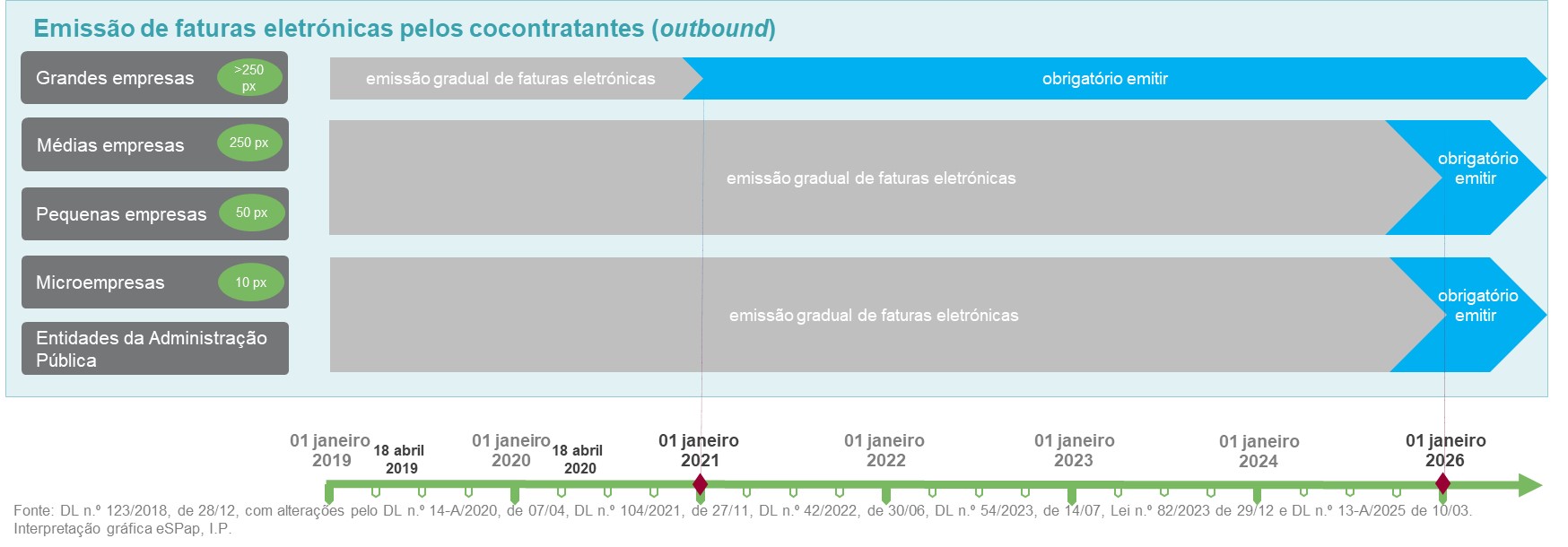
See Legal Framework in detail.
Note: To send invoices to FE-AP, you must first register the supplier (once validated, they will be able to send invoices to all FE-AP public entities). How to register?
Formats and technical standards
Ilink uses the UBL 2.1 format in the CIUS-PT technical standard, implemented by eSPap, and adapted from the European Standard EN16931 for all sales documents (Invoices and Credit Notes). For purchase documents (Orders), we use the international standard PEPPOLBIS3, also based on UBL 2.1.
Types of Integration
Before starting the integration process, you will first need to decide on the most appropriate channel for your system. This documentation covers the following types of integrations available:
🌐 Integration via REST API
Complete documentation on how to use ilink's REST APIs for integration with web systems. Includes detailed instructions on authentication, available endpoints, request and response formats, code examples, and integration best practices.
Advantages:
- It is easy to integrate into web applications or programmes that allow communication with external web services
- Allows you to send documents via XML, or alternatively by sending the document data in structured format, with ilink responsible for generating the final XML.
- Allows access to all documents previously received by a customer
- Allows you to change the state of a received document, including its acceptance, rejection, or regularisation
- Allows you to view the history of documents
📡 Integration via AS2
Detailed guide for using the preferred integration protocol by other EDI brokers, which works exclusively by transferring XML files. It requires the implementation of an AS2 client for exchanging documents and state messages. This guide covers the procedures for sending and receiving documents.
Advantages
- Universally accepted standard for EDI transmission
- It can be implemented quickly if the system to be integrated already has a functional AS2 customer
- Implements additional security mechanisms using certificates embedded in the communication protocol
- Allows the exchange of documents and state messages in real time, without the need for consultation mechanisms
- Allows you to change the state of a document (accept, reject, regularise, etc.) and send this information back to the issuer
Note: We only recommend using this protocol if your system already implements it for other partners.
🔔 Webhooks ilink
How to configure and use webhooks to receive real-time notifications about system events. This section explains how to register endpoints, configure event types, authenticate calls, and handle incoming notifications. It includes practical examples and best practices to ensure reliability and security when receiving real-time information.
Advantages
- Allows you to implement real-time callback mechanisms (Webhooks)
- The issuer can be notified when a document changes its state (accepted, rejected, etc.)
- The recipient can be notified when a new document is received
- Faster and more efficient than periodic event checking
- Complements integration via REST
Specific Integration Guides
This section details how to configure ilink integration in some particular systems. It includes step-by-step instructions and specific configuration requirements for each system:
🖥️ Moloni Integration
Moloni integration allows documents to be communicated directly between Moloni software and ilink.
🗂️ Medidata Integration
Medidata integration allows you to automate the sending and receiving of documents in Medidata suite applications via SFTP protocols. This guide contains the prerequisites necessary to enable integration with this system.
Help
Select the type of integration you wish to implement from the side menu to access the specific documentation.
For technical support, please contact the ilink team at apoio@ilink.pt or call 707 451 451.